


CleanLoom
3.4119.00 Reviews
App Specs
- Version
- V1.1.9
- Updated On
- License
- Free
- Downloads
- 5,000,000+
- Developer
- BetterFly Games
- Categories
- Tools
- Platform
- Android
Screenshots
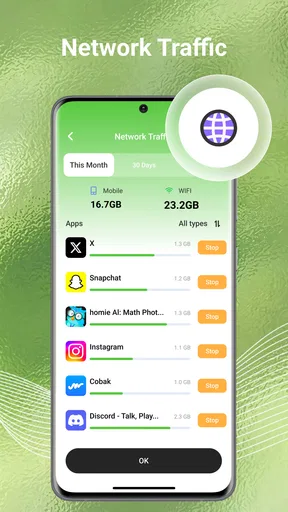
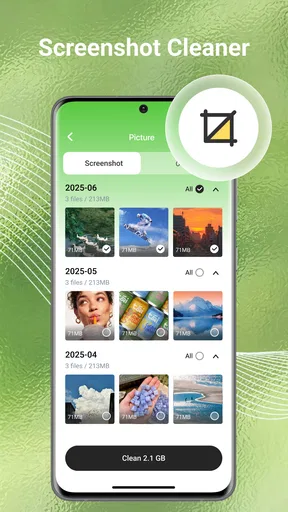
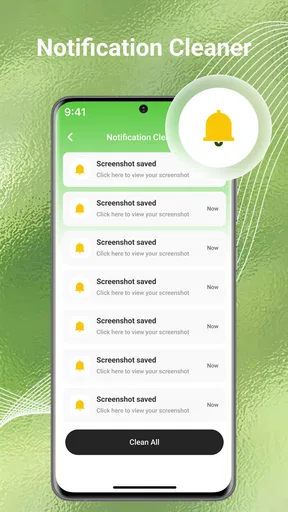
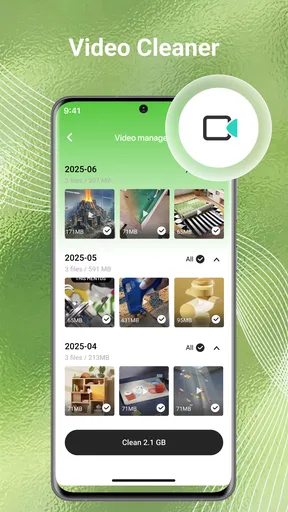
 Analysis by AppCompare
A phone can feel full long before it runs out of space: old screenshots pile up, videos linger after they have been shared, and downloads become hard to sort through. I see CleanLoom as a practical organizer for that familiar mess, rather than a substitute for thinking about what is safe to delete. Its appeal is straightforward: bring photos, videos, files, and unwanted clutter into one cleanup routine. That can be useful, but the best results still come from reviewing suggestions carefully instead of treating every cleanup prompt as an order.
Where a cleanup app can make a real difference
The most useful time to reach for a tool like this is before storage pressure becomes urgent. For example, after a weekend trip, I might have several near-identical shots, a handful of clips I already sent to family, and screenshots of directions I no longer need. Sorting those items while the trip is still fresh makes it easier to recognize what matters. A cleanup tool can help surface candidates; the final decision should stay with me.
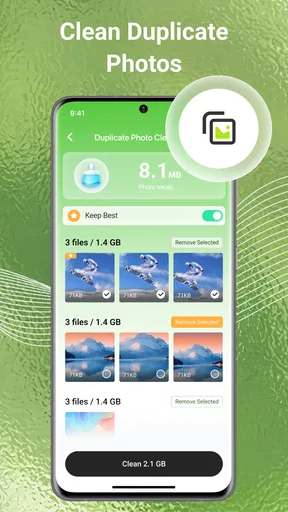
That distinction matters most with photos. Similar images are not necessarily duplicates: one frame may be sharper, another may include someone who blinked in the first. I would compare the options at full size before removing anything, and I would keep a favorite rather than assuming that the newest image is automatically the best. If I am unsure, I leave the group alone and return to it later.
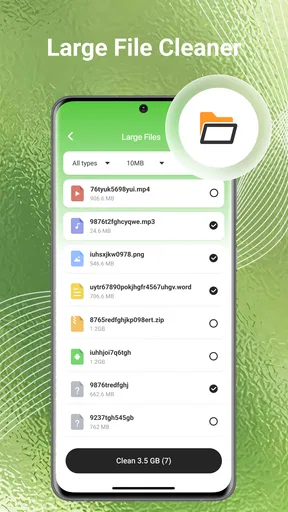
Files call for a different habit. Before removing a document, I would check its name, location, and whether I can still access another copy. A phone can hold items that look disposable but are actually useful offline, such as a ticket, receipt, or travel document. Cleaning is most effective when it clears obvious leftovers without creating a second task of recovering something important.
A sensible routine beats a dramatic cleanout
I would use CleanLoom in short, deliberate sessions rather than asking any organizer to overhaul the phone all at once. Start with a category that is easy to judge, such as old screenshots or already-shared clips, and pause before removing personal photos or documents. This approach reduces decision fatigue and makes it easier to notice whether a suggested cleanup is actually helpful.
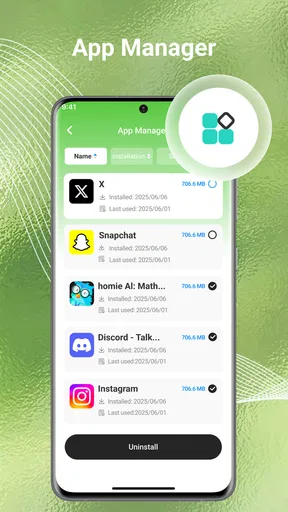
A useful rule is to clear items in batches: review a small group, confirm what should go, then check the available space before moving on. If a cleanup does not solve the storage problem, the next step may be a large video or an app you no longer use, not another sweep through treasured pictures. The point is to target the source of the clutter rather than delete indiscriminately.
I also would not rely on a recurring cleanup routine without checking what it will do. Automation is convenient when the action is predictable, but photos and files change in personal value over time. A schedule is best treated as a reminder to review, not a reason to let a tool make every decision unattended.
Worth Reading Before You Choose

Flipboard Shows What News Apps Must Do Beyond the Feed

Switching to Android Auto Means Rethinking Your Driving Routine

Google Calendar Makes a Crowded Week Easier to Manage

Ludo King Makes the Most of the Minutes Between Plans

Baby Panda World Brings Quick Play to Modern Phones, but Its Game Library Feels Busy

ESPN’s Live Game View Makes Following Close Games Easier
Who is likely to appreciate it—and who may not
CleanLoom is most appealing to someone whose camera roll and downloads folder are steadily growing and who wants a guided place to start. It may suit people who take plenty of casual photos, save files for one-off tasks, or prefer a single utility rather than opening several built-in tools. BetterFly Games is the developer, and the app is free, so it is easy to consider as a low-commitment option if a cleaner phone is the goal.
On the other hand, a person who already manages storage comfortably through the phone’s built-in settings may not need another organizer. The same is true for anyone who wants every deletion decision to remain inside a familiar system, or who would rather sort media manually in a gallery. An extra tool adds another interface to learn, and the benefit is limited if your existing routine already works.
There is also a difference between organizing and making a phone feel faster. Removing unwanted items can make more room, but it should not be treated as a guaranteed fix for every performance issue. If the phone is slow for reasons unrelated to storage, a cleanup session may leave that problem unchanged. I would use the app for clutter management, not as a promise that every device will become instantly responsive.
How it fits beside built-in tools
Most phones already offer storage screens and a gallery, so the comparison is not simply whether CleanLoom can delete files. The question is whether its cleanup-oriented presentation makes the review process easier for you. Built-in tools may be preferable when you want the fewest moving parts or rely on familiar controls. A dedicated cleaner may be more convenient when you want to look across several kinds of clutter in one place.
Cloud photo services are another alternative, but they solve a different problem. A backup can preserve memories beyond the device, while a cleaner helps you decide what is taking up local space. I would not assume that deleting a local item is harmless just because some photos are backed up; first confirm how your chosen service handles synchronization and removal. For important files, keeping a separate copy is a safer habit than trusting any cleanup workflow alone.
This is the key trade-off: convenience saves time, while manual review offers more control. If you have a large camera roll full of meaningful moments, choose control. If the mess is mostly disposable screenshots and forgotten downloads, a guided cleanup can be a more comfortable starting point.
Ever been swamped with a cluttered phone and wished for a magic wand to tidy it all up? Well, let me introduce you to CleanLoom, the app that's like having a digital Marie Kondo at your fingertips. I’ve been diving into this app for a while now, and it’s been quite the journey. Let’s get into the nitty-gritty of what makes CleanLoom a must-have for your device.
Getting Started with CleanLoom
First off, downloading and setting up CleanLoom is a breeze. Available for both Android and iOS, the app installs in a snap. As soon as you fire it up, you’re greeted with a sleek interface that’s as intuitive as it is inviting. The design is minimalistic, making navigation a walk in the park. No clutter here, ironically! The app makes you feel right at home from the get-go.
Main Features and Functionality
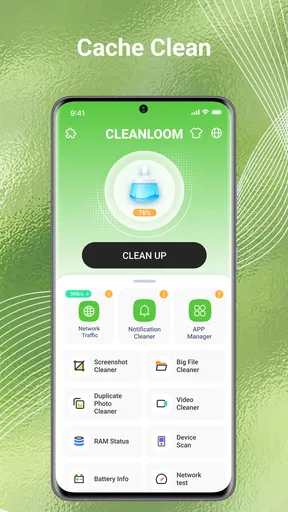
So, what exactly does CleanLoom do? Think of it as your personal assistant for digital decluttering. The app scans your device for junk files, duplicate photos, and unnecessary apps hogging up space. It’s like having a microscope that spots what your eyes might miss.
One feature that really stands out is the automatic cleaning schedule. You can set it up to run at regular intervals, ensuring your device stays in tip-top shape without lifting a finger. Now, who doesn’t love a bit of automation in their life?
The photo cleanup tool is another gem. CleanLoom intelligently identifies similar photos, helping you decide which ones to keep and which ones to toss. This is especially handy if you’re someone like me who loves snapping a million photos of the same sunset!
User Experience and Performance
Let me tell you, using CleanLoom is like driving a well-oiled machine. It’s fast, efficient, and doesn’t drain your battery like some other apps do. The app runs quietly in the background, ensuring your phone remains snappy and responsive. No more sluggish performance or freezing screens.
What’s really cool is how the app provides insights on your phone’s storage usage. It's like having a tiny data analyst in your pocket, showing you exactly where your storage is going. This feature helps you make informed decisions about what to keep and what to delete.
Privacy and Security
In today’s digital age, security is paramount. CleanLoom takes this seriously, with robust privacy settings that ensure your data remains yours. The app doesn’t access your personal files without permission and provides clear options for what it can and can’t do. It’s reassuring to know that while it’s cleaning up, it’s not snooping around.
Final Thoughts
So, is CleanLoom worth it? In my humble opinion, absolutely. It’s a well-rounded app that delivers on its promises. Whether you’re looking to free up some space, keep your device running smoothly, or just want to maintain a clutter-free phone, CleanLoom has got you covered.
Give it a try, and you might find yourself wondering how you ever managed without it. After all, a clean phone is a happy phone. And who doesn’t want a little more happiness in their pocket?
If you’re ready to take the plunge and give your device the spring clean it deserves, you can download CleanLoom from your app store. Trust me, it’s a game-changer!
What the numbers say—and what they cannot decide
CleanLoom sits in the tools category, has an average rating of 4.0 from around 3,500 ratings, and has passed 5 million installs. Those figures suggest that storage cleanup is a familiar need, but they do not tell me whether every suggested deletion will suit my habits. I treat a rating as a quick temperature check, not a substitute for careful review of my own files.
The app is marked for everyone, is free, and its current version is V1.1.6. It was released on November 10, 2025, and requires Android 7.0 or later. If you use an older Android device, check compatibility before planning your cleanup around it. For iOS users, the same practical advice applies: confirm availability and compatibility in the relevant app store before installing.
Small decisions that prevent bigger regrets
One non-obvious benefit of a guided cleanup is that it can turn an intimidating storage problem into a sequence of manageable choices. I would begin with low-stakes material, then review anything personal more slowly. That is especially helpful when sharing a phone or helping a family member tidy theirs: ask before removing files, and let the person who owns the photos make the final call.
For a busy day, I would use the app as a checkpoint rather than a rescue button. Imagine trying to record a school performance or a work demo and discovering that the phone is nearly full. A quick review of old downloads and unneeded clips may create breathing room, but it is smarter to do this before the event. A last-minute sweep invites rushed choices, and a cleanup tool cannot decide which memories matter to you.
Afterward, check the phone’s storage screen to see whether the change was meaningful. If only a small amount was cleared, look for the largest files or apps through the device’s own settings before repeating a broad scan. This simple comparison helps avoid spending time on tiny scraps while overlooking the items that actually occupy space.
My recommendation
CleanLoom is worth considering if your phone’s clutter is mostly a mix of forgotten media and files, and you appreciate having a focused place to review it. Its strongest case is convenience, especially for people who want help spotting cleanup candidates without manually opening every folder. I would still keep a backup of important material and inspect photo suggestions one by one; neither a cleaner nor a confident interface can know which image has personal value.
If you want complete manual control, already use your phone’s storage and gallery tools effectively, or expect a utility app to cure unrelated slowdowns, I would skip it. For everyone else, it can be a reasonable free option to try, provided you treat deletion as a decision rather than a reflex. My recommendation is measured: use it to bring order to the review, keep your own judgement in charge, and let the phone’s built-in storage view confirm whether the cleanup made a difference.
Pros
- User-friendly interface and easy navigation.
- Effective cleaning algorithms for storage.
- Customizable cleaning schedules.
- Supports multiple file types.
- Low battery consumption during use.
Cons
- Limited features in free version.
- Occasional ads can disrupt flow.
- No real-time monitoring available.
- Requires internet for full functionality.
- Some features require device restart.
FAQs for CleanLoom
What is CleanLoom, and how does it work?
CleanLoom is a comprehensive cleaning and optimization app designed for Android and iOS devices. It scans your device for junk files, temporary data, and unused apps, then safely removes them to free up storage space. Additionally, CleanLoom offers features like battery optimization and RAM management to enhance device performance.
Is CleanLoom safe to use on my device?
Yes, CleanLoom is developed with user safety in mind. It only removes unnecessary files and does not access personal data. The app is regularly updated to protect against security vulnerabilities, ensuring a safe experience. However, it’s always recommended to download the app from official stores like Google Play or the App Store.
Does CleanLoom require a subscription or is it a free app?
CleanLoom offers both a free version and a premium version. The free version includes basic cleaning and optimization tools, while the premium version, available through a subscription, provides advanced features like deep cleaning, ad-free usage, and priority customer support. Users can choose based on their needs and preferences.
How does CleanLoom improve device performance?
CleanLoom enhances performance by clearing cache, deleting unnecessary files, and managing background processes. This leads to faster load times and smoother operation. Its battery optimization feature ensures longer device usage by reducing power consumption from apps running in the background.
Can CleanLoom help with malware protection?
While CleanLoom primarily focuses on cleaning and optimization, it does include basic security features to help identify and remove suspicious files. However, it is not a replacement for a dedicated antivirus app. For comprehensive protection, consider using a specialized security application alongside CleanLoom.


